


Table of Contents
- What Is a CMS?
- What Is WordPress?
- CMS vs WordPress: The Main Difference
- WordPress vs Other CMS Platforms
- Ease of Use
- Customization and Flexibility
- Content Management
- SEO Capabilities
- Maintenance and Updates
- Cost: Which Option Is More Affordable?
- Security: CMS vs WordPress
- Scalability
- When WordPress Is the Right Choice
- When Another CMS May Be Better
- WordPress.org vs WordPress.com
- A Simple CMS vs WordPress Comparison
- Questions to Ask Before Choosing a Platform
- Final Verdict: CMS vs WordPress
While WordPress is one of the most widely used content management systems, it is not the only option available. Different CMS platforms offer different levels of flexibility, technical control, and built-in features. Therefore, understanding the main differences can help you make a more informed decision based on your website’s goals, budget, and long-term requirements.
You may see terms such as CMS, WordPress, website builder, and content platform used together. As a result, it is easy to assume that CMS and WordPress are two completely different types of platforms.
However, that is not exactly correct.
WordPress is a CMS.
A CMS, or content management system, is a broader category of software used to create, manage, and publish digital content. WordPress is one example of a CMS.
So, the real question is usually not:
CMS or WordPress?
Instead, the better question is:
Do you need WordPress, or would another type of CMS better suit your website?
The answer depends on your goals, technical requirements, budget, and the level of control you need.
This guide explains the difference in simple terms. It also compares WordPress with other CMS options and helps you decide which approach may work best for your website.
What Is a CMS?
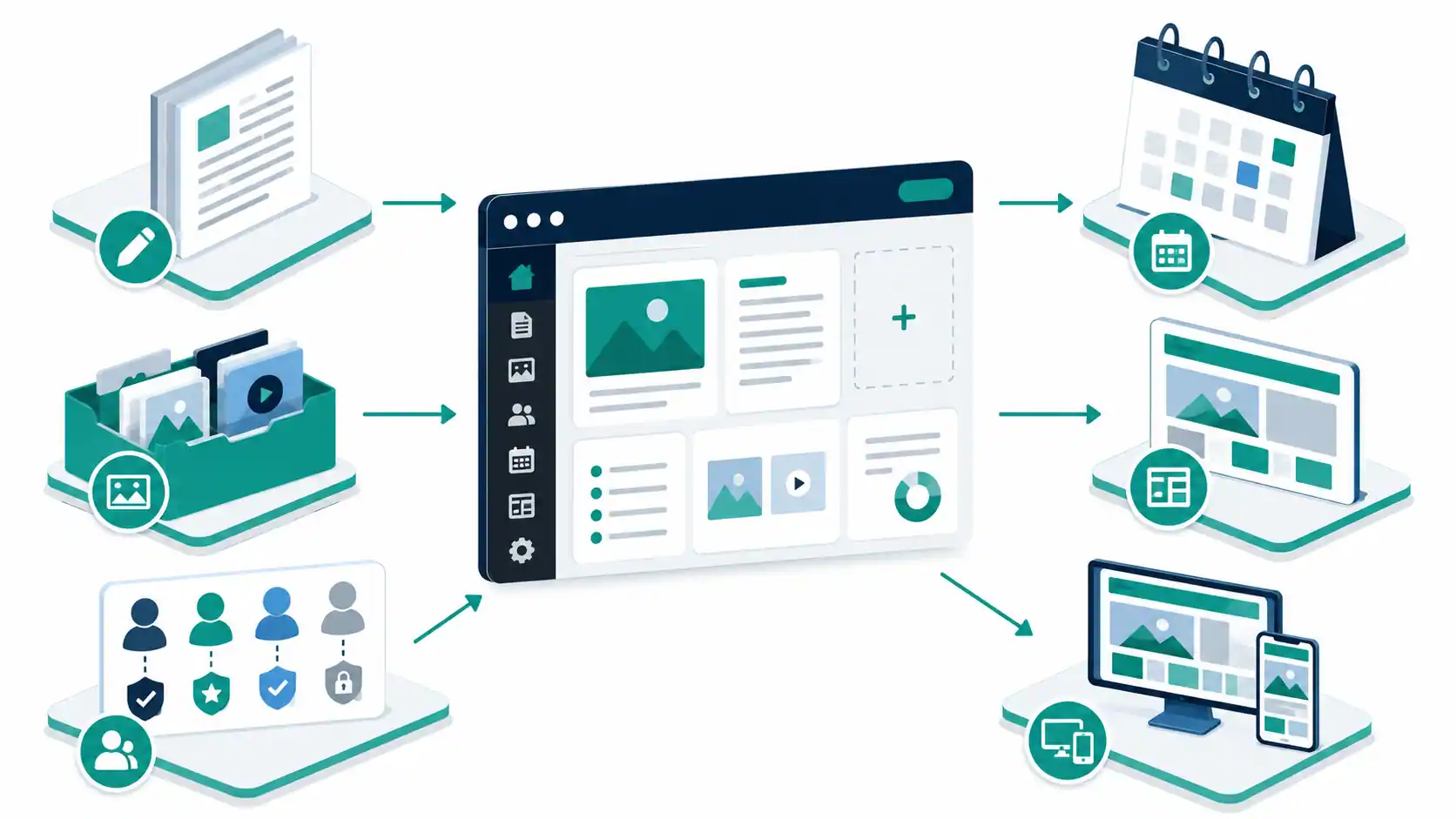
A content management system, commonly called a CMS, is software that helps you create, organize, update, and publish website content.
In simple terms, a CMS gives you a dashboard where you can manage your website without manually editing every page in HTML.
For example, a CMS can help you:
- Create pages and blog posts
- Edit existing content
- Upload images and media
- Organize content
- Manage users
- Control publishing permissions
- Update website information
A typical CMS also allows multiple people to work on the same website with different permission levels. For example, an administrator may control the entire website, while an author may only create and edit content.
Without a CMS, managing a large website can require more direct technical work.
With a CMS, the content management process becomes more accessible.
That is why CMS platforms are widely used for blogs, business websites, publications, online stores, and larger digital platforms.
Common Types of CMS Platforms
A CMS can come in different forms.
Some platforms are open source. Others are proprietary or hosted services.
Common examples include:
- WordPress
- Drupal
- Joomla
- Shopify
- Contentful
- HubSpot CMS
These platforms do not all work in the same way.
Some focus on flexibility.
Others focus on ease of use.
Some require more technical knowledge, while others manage much of the technical infrastructure for you.
Therefore, choosing a CMS should start with your actual requirements.
What Is WordPress?
WordPress is a free and open-source content management system. The WordPress project is licensed under the GPL and developed by a global open-source community.
It began as a publishing platform and has developed into a flexible system for building many types of websites. Today, WordPress can support blogs, business websites, portfolios, publications, online communities, and other types of web projects.
WordPress includes tools for creating and publishing content.
It also supports themes and plugins.
A theme controls much of the website’s visual presentation.
Plugins can extend the functionality of a WordPress website.
For example, plugins can add features for:
- SEO
- Contact forms
- E-commerce
- Security
- Analytics
- Memberships
- Booking systems
This flexibility is one reason why WordPress is used for many different website types. According to the official WordPress feature overview, WordPress powers more than 43% of the web.
However, flexibility also creates responsibility.
If you use self-hosted WordPress, you usually need to think about hosting, updates, backups, security, and plugin management.
Therefore, WordPress can be simple for beginners while still requiring ongoing maintenance.
CMS vs WordPress: The Main Difference
The biggest difference is simple:
CMS is a category. WordPress is a specific CMS.
Think of it like this.
A CMS is similar to the word “vehicle.”
A car is one specific type of vehicle.
In the same way, WordPress is one specific type of CMS.
This distinction matters because comparing “CMS vs WordPress” can be misleading.
You are actually comparing:
WordPress vs other CMS options.
For example, you may compare WordPress with:
- Drupal
- Shopify
- Joomla
- A headless CMS
- A proprietary enterprise CMS
Each option has different strengths.
The right choice depends on what you want your website to do.
WordPress vs Other CMS Platforms
The easiest way to compare WordPress with another CMS is to look at the areas that affect your website.
These include:
- Ease of use
- Customization
- Cost
- Maintenance
- Scalability
- Security
- Content management
- Technical requirements
Let us look at each area.

Ease of Use
A CMS should make it easier to manage content.
However, ease of use can mean different things for different users.
Some people want a simple interface where they can quickly publish pages.
Others need advanced workflows and structured content.
WordPress is designed to make publishing accessible. It includes tools for creating posts and pages, managing media, scheduling content, and assigning user roles.
For a typical business website or blog, this can make WordPress relatively easy to learn.
However, a complex WordPress website can become more difficult to manage when it depends on many plugins or custom features.
Other CMS platforms may provide a more structured experience.
For example, an enterprise CMS may offer advanced content workflows and permissions.
However, that added structure can also increase complexity.
Best for Beginners
WordPress can be a strong option for beginners who want control over their website.
A simpler hosted CMS may be easier if you do not want to manage technical maintenance.
The best option depends on how much responsibility you want to handle.
Customization and Flexibility
Customization is one of WordPress’s main strengths.
WordPress supports themes for design and plugins for additional functionality.
The WordPress project also supports custom content types and other development options for more advanced websites.
This means that a basic WordPress website can start as a simple blog and later develop into something more complex.
For example, you may add:
- An online store
- A membership area
- A booking system
- A learning platform
- A resource library
However, more customization does not always mean a better website.
Adding unnecessary plugins can increase maintenance and compatibility risks.
Therefore, choose tools based on real requirements.
If your website only needs five important features, installing twenty additional plugins may create unnecessary complexity.
Content Management
This is where CMS platforms become especially useful.
A good CMS should make it easy to create, edit, organize, and publish content.
WordPress includes publishing tools such as drafts, scheduled publishing, revisions, media management, and user roles.
These features can work well for:
- Blogs
- News websites
- Company websites
- Content-heavy websites
Other CMS platforms may offer more specialized workflows.
For example, a large organization may need strict approval processes before content goes live.
A headless CMS may also be useful when the same content needs to appear across several platforms, such as a website and mobile application.
Therefore, content requirements should influence your decision.
Ask yourself:
Who will create the content?
Who will approve it?
How often will the website be updated?
Will the same content appear in multiple places?
Your answers can help narrow your options.
SEO Capabilities
SEO does not depend on the CMS alone.
A CMS cannot guarantee high rankings.
However, the platform can affect how easily you manage important SEO elements.
For example, you may need control over:
- Page titles
- URLs
- Headings
- Internal links
- Structured data
- Content updates
- Website performance
WordPress provides search-engine-friendly publishing features and can be extended through plugins for more detailed SEO management.
However, the results still depend on how the website is built and managed.
A poorly optimized WordPress website can have SEO problems.
Likewise, a well-built website on another CMS can perform well in search.
Therefore, do not choose WordPress only because someone says it is “best for SEO.”
Instead, consider whether the platform gives you the level of control your SEO strategy requires.
For a broader framework covering search intent, technical health, internal linking, page experience, and authority, read our SEO strategies guide for 2026.
Maintenance and Updates
Maintenance is one of the most important differences between CMS options.
With self-hosted WordPress, you generally manage your own:
- Hosting
- Software updates
- Theme updates
- Plugin updates
- Backups
- Security practices
WordPress provides documentation and tools to help users maintain and secure their websites. Its official update guide recommends backing up before an update and explains both one-click and automatic background updates.
However, the website owner or their technical team still needs to manage the overall environment.
A hosted CMS can reduce some of this responsibility.
For example, the hosting provider may manage server maintenance and platform updates.
This can save time.
However, it may also reduce your control over the environment.
Therefore, the decision is often a trade-off.
More Control
Self-hosted WordPress may be a better fit.
Less Technical Maintenance
A managed or hosted CMS may be more convenient. Before choosing a platform, think about who will maintain it after launch.
A website is not finished when it goes live. It requires ongoing attention.
Cost: Which Option Is More Affordable?
The cost of a CMS depends on more than the platform itself.
WordPress software is open source and available without a software licensing fee. However, running a WordPress website can still involve costs for hosting, a domain name, premium themes, plugins, development, maintenance, and security services.
Other CMS platforms may use subscription pricing. That can make costs more predictable.
However, monthly fees can increase as your requirements grow. Therefore, do not compare platforms based only on the starting price.
Instead, estimate the total cost.
Consider:
- Initial setup
- Hosting
- Development
- Premium tools
- Maintenance
- Support
- Future upgrades
A cheaper platform may become expensive if it requires major customization later.
Likewise, a more expensive platform may save time if it includes features you would otherwise need to build separately.
Security: CMS vs WordPress
No CMS is automatically secure forever.
Security depends on several factors.
These include:
- Software updates
- Hosting
- User access
- Password practices
- Plugins or extensions
- Website configuration
WordPress receives updates and security improvements through its open-source project and ecosystem.
However, a WordPress website can become vulnerable if the owner ignores updates or installs poorly maintained software. WordPress’s plugin management documentation specifically recommends keeping plugins updated to support security and performance.
The same principle applies to other CMS platforms.
A platform can have strong security features, but poor website management can still create risks. Therefore, choose a platform that your team can realistically maintain. Security should not depend on choosing a popular brand.
It should depend on good processes.
Scalability
Many website owners think about their current needs. However, your future needs also matter.
For example, your website may start with:
- Five pages
- One contact form
- A small blog
Later, you may want:
- Hundreds of articles
- Multiple authors
- An online store
- Membership features
- Additional languages
- Custom integrations
WordPress can be extended in many directions through its theme, plugin, and development ecosystem.
However, scalability also depends on the quality of the implementation. A poorly designed website may experience problems as traffic and complexity increase.
Therefore, scalability is not only about choosing the right CMS. It is also about architecture, hosting, development, and maintenance. The official WordPress performance handbook identifies hosting, configuration, software versions, images, and caching among the factors that affect performance.
When WordPress Is the Right Choice
WordPress can be a strong choice if you want flexibility and control.
It may work well for:
Blogs and Content Websites
WordPress began as a publishing platform and continues to provide strong content management features.
It can work well when you regularly publish articles.
Small and Medium Business Websites
Businesses can use WordPress to create service pages, blogs, contact pages, and other important website content.
SEO-Focused Websites
WordPress gives users significant control over content and can be extended with SEO tools.
However, good SEO still requires strategy and proper implementation.
Websites That May Grow
WordPress can support additional features over time.
This can be useful if your requirements are likely to change.
Users Who Want Ownership and Control
Self-hosted WordPress gives you more control over your website environment and data than many closed hosted platforms. WordPress also emphasizes data ownership and the freedom to modify the open-source software.
When Another CMS May Be Better
WordPress is not automatically the right choice for every project.
Another CMS may be better when your requirements are very specific.
You Want Minimal Technical Responsibility
A fully hosted platform may manage updates, hosting, and infrastructure for you.
This can simplify website management.
You Need Specialized Enterprise Workflows
Large organizations may require advanced permissions, approval systems, and structured workflows.
A specialized CMS may provide these features more directly.
You Need a Headless Architecture
A headless CMS separates content management from the front-end presentation.
This can be useful when content needs to power multiple digital experiences.
For example:
- Websites
- Mobile apps
- Digital displays
- Other connected platforms
However, a headless architecture can require more technical expertise.
Your Website Has a Very Specific Purpose
Some platforms focus heavily on particular use cases.
For example, an e-commerce-focused platform may provide a more direct solution for businesses that primarily need an online store.
In that case, choosing a platform designed around your core requirement may reduce unnecessary customization. For a practical example of a hosted commerce platform, see our guide to building a better Shopify store.
WordPress.org vs WordPress.com
One important point can create confusion.
WordPress and WordPress.com are not the same thing.
WordPress, often referred to as WordPress.org or self-hosted WordPress in this context, is open-source software that you can install on a hosting provider.
WordPress.com is a hosted service that runs WordPress software in a managed environment. As the official WordPress.com and WordPress.org comparison explains, both use WordPress software; the main difference is how the website is hosted and who manages the technical environment.
With self-hosted WordPress, you generally have more direct control.
However, you also take on more responsibility for maintenance.
With WordPress.com, the hosting environment manages more of the technical infrastructure.
Therefore, if you choose “WordPress,” you should also decide which WordPress approach suits your needs.
This difference can affect:
- Cost
- Customization
- Maintenance
- Hosting
- Technical control
It is worth understanding this distinction before choosing a platform.
A Simple CMS vs WordPress Comparison
Choose WordPress if you need:
- Strong content management
- Flexibility
- Theme customization
- Plugin support
- SEO control
- The ability to expand your website
- Greater control over your website environment
Consider another CMS if you need:
- Fully managed infrastructure
- Minimal technical maintenance
- Specialized enterprise workflows
- A headless architecture
- A platform built around a specific use case
There is no universal winner.
The best choice depends on your project.
Questions to Ask Before Choosing a Platform
Before making a decision, answer these questions.

What Is the Main Purpose of the Website?
Is it a blog?
A business website?
An online store?
A membership platform?
A publication?
The main purpose should influence your choice.
Who Will Manage the Website?
If a non-technical team will update the website, ease of use matters.
If you have developers, you may have more flexibility.
How Often Will You Publish Content?
A content-heavy website needs strong publishing and organization tools.
This is an area where WordPress can be a practical option.
What Features Do You Need?
List the features before choosing the platform.
For example:
- Contact forms
- E-commerce
- Bookings
- Memberships
- Multiple languages
- User accounts
Then check whether the platform can support those requirements without unnecessary complexity.
What Is Your Long-Term Plan?
Think beyond launch.
Your website may need to grow.
Choose a platform that can reasonably support your future goals.
Final Verdict: CMS vs WordPress
The comparison between CMS and WordPress can be confusing because WordPress is already a CMS.
The real decision is whether WordPress is the right CMS for your website.
WordPress can be an excellent choice for blogs, business websites, content-driven projects, and websites that need flexibility.
Its open-source nature, publishing tools, customization options, and large ecosystem make it suitable for many different projects.
However, it also requires the right level of maintenance. Another CMS may be a better choice if you need fully managed infrastructure, specialized enterprise workflows, or a highly specific technical architecture.
The best approach is simple. First, define what your website needs. Then consider who will manage it.
After that, compare the total cost, flexibility, maintenance requirements, and future growth options. Do not choose a CMS simply because it is popular. Choose the platform that makes it easier to achieve your actual business and content goals.
If you need help evaluating a migration, custom WordPress build, or platform-specific requirements, you can contact Shahrozaligill.com with the details of your project.