



Table of Contents
- What Is Technical SEO?
- Why Is Technical SEO Important?
- How Search Engines Move From a URL to a Search Result
- The Technical SEO Areas That Deserve Attention
- A Realistic Example: A Redesign That Looks Fine but Loses Visibility
- How to Run a Practical Technical SEO Audit
- How to Prioritize What You Find
- Common Technical SEO Mistakes
- Who Should Handle Technical SEO?
- How Often Should You Review Technical SEO?
- A Technical SEO Checklist for Website Owners
- When Professional Help Is Worth It
- Frequently Asked Questions
- The First Step Is Smaller Than a Full Audit
Why does that matter? A useful page cannot earn search traffic if a crawler cannot reach it, a noindex rule excludes it, or the server repeatedly fails to load it. Less dramatic problems can still waste crawl activity, split signals between duplicate URLs, or frustrate visitors.
Technical SEO removes those barriers. It does not guarantee rankings, and it cannot rescue content that fails to answer the searcher’s question. Think of it as the foundation that allows strong content, internal links, and earned authority to do their jobs.
What Is Technical SEO?
Technical SEO is the process of improving a website’s infrastructure so search engines can find, process, and understand its important pages without unnecessary obstacles.
Some of the work happens in visible parts of the site. Navigation, mobile layouts, and loading behavior affect both people and crawlers. Other work sits behind the page: HTTP responses, redirect rules, canonical tags, rendering, server configuration, and sitemap files.
The boundaries are not perfectly rigid, but this distinction is useful:
- On-page SEO shapes the content and page elements a searcher sees, including headings, copy, titles, and descriptive links.
- Off-page SEO deals largely with signals earned elsewhere, such as editorial links and mentions.
- Technical SEO deals with the systems that let search engines access and process the site reliably.
All three overlap. A clean internal link is part of the content experience and the crawl path. Faster templates are technical improvements that can also make pages easier to use. That overlap is normal.
Why Is Technical SEO Important?
Search visibility starts with eligibility. Google’s current technical requirements say that Googlebot must not be blocked, the page must return an HTTP 200 success response, and the page must contain indexable content. Meeting those conditions does not guarantee indexing, but failing them can stop a page before its relevance is even considered.
Technical SEO matters for four practical reasons.
It Helps Search Engines Reach the Pages You Value
A site may contain hundreds of URLs while only a smaller group supports sales, leads, subscriptions, or useful information. Those priority pages need reliable paths from navigation, category pages, and related content.
An XML sitemap can support discovery, but it should not be the only route to an important page. Pages that sit outside the site’s link structure are harder for visitors to find and easier for a team to forget.
It Prevents Conflicting Instructions
Websites send signals in several ways. A URL may appear in a sitemap, point to another canonical, redirect elsewhere, and carry an indexing directive at the same time. Those signals should tell one coherent story.
Conflict often appears after a redesign, domain change, plugin update, or staging launch. A single template error can affect a large section of the site, which is why technical checks belong in release planning rather than only in annual audits.
It Supports a Better Visitor Experience
Slow responses, shifting layouts, broken buttons, and mobile content gaps are not abstract crawler problems. They affect the person trying to read an article, compare a service, or complete a purchase.
Performance is only one part of that experience. Clear navigation, working forms, readable text, stable layouts, and sensible error handling matter too.
It Makes Growth and Change Safer
A five-page brochure site can be checked manually. Growing publications, marketplaces, and ecommerce stores cannot rely on memory. New filters, templates, languages, and integrations create more URLs and more ways for instructions to drift.
A sound technical setup makes the site easier to expand. It also gives the team a way to detect damage when something changes.
For the broader relationship between technical health, content, search intent, and authority, see our SEO strategies guide.
How Search Engines Move From a URL to a Search Result
Google describes Search as a sequence of crawling, indexing, and serving. Rendering becomes especially important when JavaScript builds or changes the page. Understanding that journey makes technical problems much easier to diagnose.

- Discovery: A crawler learns that a URL exists. It may find the URL through a link, a sitemap, or a previously known page.
- Crawling: The crawler requests the URL and receives a response from the server.
- Rendering: The search engine processes the page and may execute JavaScript to see content added by the browser.
- Indexing: Eligible content is analyzed and may be stored in the search index. Indexing is never guaranteed.
- Serving: The search engine decides whether the indexed page is relevant and useful for a particular query.
Google’s guide to how Search works explains the stages in more detail.
This sequence also gives you a diagnostic order. When a page is missing from search, do not begin by rewriting its introduction. First ask whether the URL was discovered, whether the crawler could fetch it, what the server returned, what the rendered page contained, and whether an indexing instruction excluded it.
The Technical SEO Areas That Deserve Attention
There is no universal list of fixes that every website needs. A local service site, a national ecommerce store, and a JavaScript application create different risks. The following areas cover the issues most websites should understand.
Crawlability and Site Architecture
Crawlability describes whether a search engine can reach a page and the resources needed to understand it. Site architecture determines how pages are organized and connected.
Important pages should be reachable through standard HTML links. Google’s link guidance recommends crawlable <a> elements with useful destinations. Descriptive anchor text also helps people and search engines understand what lies ahead.
A practical structure often moves from broad to specific:
Home → main category → subcategory or service → detailed page
That is a model, not a rule that every site must force. What matters is that a visitor can predict where information lives and that priority pages are not isolated.
During a review, look for:
- valuable pages with no internal links pointing to them;
- navigation that depends on interactions a crawler may not trigger;
- links that lead through unnecessary redirect chains;
- filters or calendar pages that create near-infinite URL combinations;
- important content buried several unclear steps from the main navigation.
Internal links should help the reader continue, not turn every paragraph into a block of exact-match anchors. External authority works differently; our guide to earning quality backlinks explains that side of SEO.
Robots.txt and Indexing Directives
Robots.txt controls which URLs compliant crawlers may request. It is mainly a crawl-management tool, not a dependable way to remove a web page from search results. Google’s robots.txt documentation warns that a blocked URL can still appear if Google discovers it elsewhere.
The noindex rule serves a different purpose. It tells supporting search engines not to include the page in their results. Google must be allowed to crawl the URL to see that rule, so combining Disallow with noindex can defeat the intended setup.
A basic HTML implementation looks like this:
<meta name="robots" content="noindex">Non-HTML files can use an X-Robots-Tag response header. Google’s noindex guide covers both methods.
Before changing either control, write down the intended outcome. “Reduce unnecessary crawling,” “keep an internal search page out of results,” and “protect private customer data” are different problems. Private material needs authentication or access control, not a robots instruction.
XML Sitemaps
An XML sitemap is a machine-readable list of URLs you want search engines to know about. It is useful for a new site, a large site, or a property with pages that are difficult to discover through normal links.
Google treats sitemap submission as a hint. Its sitemap documentation says inclusion does not guarantee crawling or indexing.
A clean sitemap should normally contain canonical, indexable URLs that return successful responses. Removing a URL from the sitemap does not remove it from the web or the index. It simply stops presenting that file as a preferred discovery source.
Many content management systems generate sitemaps automatically. If you are still choosing a platform, our CMS versus WordPress guide explains the wider differences in publishing control and maintenance responsibility.
Canonicalization and Duplicate URLs
Duplicate URLs are not always a sign of copied content. Tracking parameters, print views, sorting options, product variants, HTTP and HTTPS versions, or trailing-slash rules can create several addresses for the same or substantially similar material.
A canonical signal tells a search engine which URL you prefer as the representative version. Common methods include permanent redirects, rel="canonical", consistent internal links, and sitemap inclusion.
The HTML element looks like this:
<link rel="canonical" href="https://www.example.com/preferred-page/">Canonical tags are signals, not commands. Google may select a different representative when the page content and other signals do not support your choice. Its canonicalization guidance recommends linking internally to the preferred URL and keeping signals consistent.
Do not point unrelated pages to one canonical just to reduce an index count. If two pages serve different needs, forcing one as the canonical can hide useful content instead of solving duplication.
Faceted navigation deserves special care on ecommerce and directory sites. A few useful filters can improve shopping. Thousands of crawlable combinations for color, size, price, sort order, and availability can consume resources without creating distinct search value.
HTTP Status Codes, Redirects, and Broken URLs
The server’s response tells a crawler what happened when it requested a URL.
200means the request succeeded.301and308indicate a permanent move.302and307indicate a temporary move.404and410mean the requested resource is unavailable.5xxresponses signal a server-side failure.
A 404 is not automatically an SEO emergency. It is appropriate when a removed page has no close replacement. The problem is a valuable URL that breaks unexpectedly or an internal link that keeps sending people to a dead end.
When a page has moved, redirect it to the closest relevant replacement. Sending every retired URL to the home page creates a poor experience and can be treated as a soft 404. Google’s redirect documentation recommends permanent redirects when the change is intended to last.
Watch for redirect chains as well. If page A redirects to B and B redirects to C, update links to point directly to C where possible. That removes an unnecessary request and makes the final destination clearer.
Persistent server errors deserve quick attention. They can reduce crawl activity and eventually cause indexed URLs to disappear if Google cannot retrieve them for an extended period.
JavaScript Rendering
Modern sites often use JavaScript for navigation, product data, interactive tools, and page content. Google can render JavaScript, but that does not make every implementation search-friendly.
Google’s JavaScript SEO guide describes crawling, rendering, and indexing as separate processing phases for JavaScript applications. A page may return a successful response while its meaningful content appears only after a failed API call or a user interaction.
Check the rendered page when:
- important text is absent from the original HTML;
- links appear only after a click, swipe, or form submission;
- content changes between logged-in and public views;
- a framework update coincides with lost pages;
- titles, canonicals, or robots tags are changed by client-side code.
The URL Inspection tool can show the HTML Google received and a rendered screenshot. Browser developer tools and a JavaScript-capable crawler can help compare the initial response with the finished page.
Server-side rendering or static generation can reduce some risks, but neither label guarantees a healthy site. Test what users and crawlers actually receive.
Mobile-First Indexing
Google uses the mobile version of a site’s content for indexing and ranking. A responsive layout usually makes parity easier because the same URL and HTML can adapt to the screen.
The risk appears when the mobile version removes important text, internal links, images, metadata, or structured data. A cleaner mobile design is fine; a materially incomplete mobile page may give Google less information to process.
Google’s mobile-first indexing guidance recommends equivalent primary content and indexing signals across mobile and desktop versions. It also warns against loading primary content only after user interaction.
Test more than appearance. Confirm that menus work, buttons can be tapped, forms can be completed, text remains readable, and content does not overflow the viewport.
Page Speed and Core Web Vitals
Page speed affects whether visitors can comfortably use a site. Core Web Vitals provide three specific measures of real-world loading, responsiveness, and visual stability:
- Largest Contentful Paint (LCP) should occur within 2.5 seconds for a good experience.
- Interaction to Next Paint (INP) should be below 200 milliseconds.
- Cumulative Layout Shift (CLS) should remain below 0.1.
Those thresholds come from Google’s current Core Web Vitals guidance. They are useful targets, not a promise of better rankings.
Start with field data when it is available because it reflects real visits over time. Lab tools are better for reproducing a problem and testing a possible fix. PageSpeed Insights shows both when enough field data exists.
Common causes include oversized hero images, slow server responses, render-blocking resources, heavy third-party scripts, unstable ad or image dimensions, and JavaScript that occupies the browser’s main thread.
Do not remove a feature simply because an audit score dislikes it. Identify the actual bottleneck, understand what the feature contributes, and test the change on representative devices and connections.

HTTPS and Website Security
HTTPS encrypts data between a visitor’s browser and the website. It should be the consistent default, not an optional copy of the site.
After a migration from HTTP, confirm that every old URL redirects to its HTTPS counterpart. Update internal links, canonicals, sitemaps, images, scripts, and stylesheet references. Mixed-content warnings occur when a secure page still requests an insecure resource.
Technical SEO does not replace security maintenance. Keep the platform, plugins, dependencies, certificates, access controls, and backups in order. A compromised page can damage visitors and search visibility far beyond a minor optimization issue.
Structured Data
Structured data gives search engines explicit information about eligible page types and entities. Valid markup may support a rich search appearance, but it is not a ranking shortcut.
Choose a type that Google currently supports, follow its feature-specific requirements, and keep the markup consistent with the visible page. Do not add ratings, prices, authors, or events that visitors cannot verify on the page.
Google’s structured data guidelines state that correct markup does not guarantee a rich result. Test eligible pages with the Rich Results Test, then monitor relevant Search Console enhancement reports.
A Realistic Example: A Redesign That Looks Fine but Loses Visibility
Imagine a U.S. home-services company replacing an older website. The new pages look cleaner and load on employees’ phones, yet organic leads fall after launch.
The cause is unlikely to be one mysterious “SEO score.” A review might uncover several connected mistakes:
- old city-service URLs were redirected to the home page instead of their closest replacements;
- the new service template inherited a
noindextag from staging; - navigation links were created as script-controlled elements rather than standard links;
- the mobile layout omitted service-area text and related-location links;
- the sitemap still listed retired URLs;
- a large background video slowed the main service pages.
The repair order matters. Removing the site-wide noindex and correcting broken redirects come before compressing decorative images. Restoring crawlable navigation and mobile content comes before experimenting with structured data.
This is what useful technical SEO looks like: confirm the failure, identify the shared cause, fix the highest-impact barrier, and verify the result. It is not a race to clear every warning in an audit tool.
How to Run a Practical Technical SEO Audit
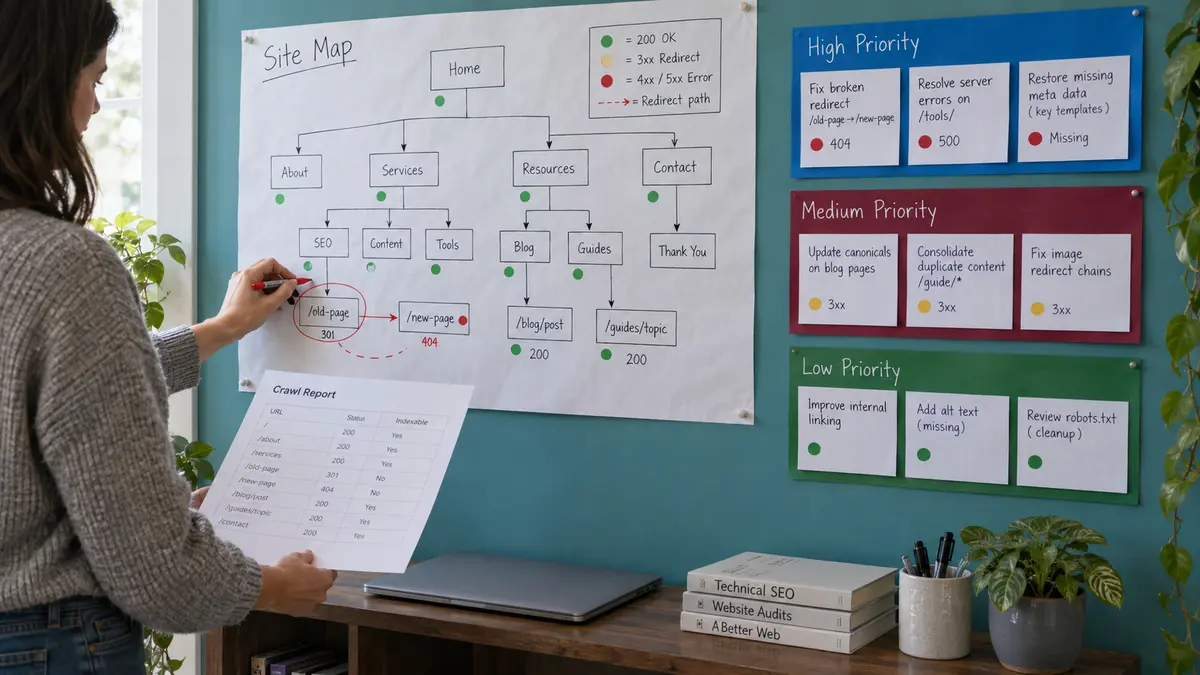
A crawler can collect thousands of data points. An audit becomes valuable only when those findings explain what is wrong, which pages are affected, and what should happen next.
1. Define the Pages That Matter
Start with a small, deliberate set: the home page, primary service or category pages, strong content pages, key conversion pages, and several examples from each major template.
Record what each URL is supposed to do. Should it be indexed? Which URL is canonical? Does it have a replacement? Who owns the page? Without that context, an audit can mistake an intentional exclusion for an error.
2. Review Search Console Before Crawling
Search Console shows Google’s view of the verified property. Check the Page Indexing report, Crawl Stats, Core Web Vitals, manual actions, security issues, and any structured data reports that apply.
Use URL Inspection on representative pages. Compare the declared canonical with Google’s selection, review crawl details, and inspect the rendered result when JavaScript or mobile parity is in question.
3. Crawl the Website
Run a crawler from the public starting point and, when useful, compare that result with the XML sitemap. Collect status codes, index directives, canonicals, titles, internal links, page depth, duplicate patterns, and redirect paths.
Do not assume the crawler is correct simply because the export is large. Authentication, blocked resources, JavaScript settings, crawl limits, and custom routing can all change what the tool sees.
4. Test Representative Templates and Journeys
Open examples from every important template on desktop and mobile. Test navigation, search, filters, pagination, forms, checkout steps, and error states where they apply.
Check the response and rendered content, not just the visible design. One working article does not prove that every product, location, or category template is healthy.
5. Trace Symptoms to Root Causes
If 2,000 pages lack a canonical, the likely task is one template repair rather than 2,000 manual edits. When a group of URLs returns 404, ask whether an import, routing rule, deleted category, or malformed internal link created them.
Group findings by cause and template. That makes the work smaller, safer, and easier to verify.
6. Test Changes Before a Site-Wide Release
Apply high-risk changes in a staging or limited environment. Check the generated HTML, HTTP response, redirects, robots rules, canonicals, structured data, sitemap output, and mobile rendering.
Staging should be protected from public indexing, but those protections must not reach production. Include their removal in the launch checklist rather than relying on memory.
7. Verify After Deployment
Re-crawl affected templates, inspect several live URLs, and watch Search Console over the following days and weeks. Search engines need time to revisit pages, so separate deployment confirmation from later indexing and traffic effects.
Keep a change log. When a metric shifts, the release date, URLs affected, and expected outcome provide far more insight than a screenshot of a generic health score.
How to Prioritize What You Find
Audit tools often present every warning with equal visual urgency. Your repair queue should not.
Judge each issue against five questions:
- Severity: Can it prevent crawling, indexing, rendering, or normal use?
- Reach: Does it affect one old page, an important template, or the entire site?
- Business value: Are revenue, lead, subscription, or high-demand pages involved?
- Confidence: Have you verified the cause with more than one signal?
- Risk and effort: Can the fix create wider damage, and how will you test it?
A site-wide production noindex, widespread 5xx errors, or broken redirects after a migration usually deserves immediate attention. Redirecting internal links and missing sitemap entries may be important but less urgent. Minor markup warnings on archived pages can wait.
Prioritization protects the team from polishing low-value details while important pages remain unavailable.
Common Technical SEO Mistakes
- Treating the audit score as the goal: A tool’s score summarizes its own checks. It does not know every business priority, intentional exclusion, or implementation constraint. Use the score to spot changes, not as the site’s objective.
- Using a sitemap to repair weak architecture: A sitemap can aid discovery, but it does not make an isolated page easy for people to find. Important pages still need sensible navigation and internal links.
- Changing URLs without a clear reason: A shorter URL is not automatically worth a migration. Every change creates redirect, internal-link, analytics, and recrawling work. Preserve a stable address unless the benefit justifies the risk.
- Redirecting removed pages to the home page: The home page is rarely a relevant substitute for a discontinued product or retired article. Redirect to a close replacement when one exists; otherwise, a helpful 404 or 410 may be more honest.
- Blocking crawling to prevent indexing: Robots.txt and
noindexsolve different problems. If Google cannot crawl the page, it cannot reliably see the indexing directive on that page. - Applying canonicals in bulk without checking meaning: Canonicalization is not a cleanup button. Pointing distinct pages to one URL can remove useful options from search. Confirm that the pages are duplicates or close substitutes.
- Chasing speed without measuring the experience: A perfect lab score on one test does not prove that the site feels fast for real visitors. Use field data, test key templates, and connect each proposed change to an observed bottleneck.
- Adding structured data everywhere: Markup should describe the visible content and meet the rules for a supported feature. More schema does not mean more relevance.
- Fixing individual URLs when the template is broken: Repeated symptoms often share one cause. Correct the generator, component, or routing rule, then verify a sample and re-crawl the affected group.
Who Should Handle Technical SEO?
The answer depends on the site and the change.
A website owner or marketer can often review Search Console, confirm which pages should be public, test links, check sitemap contents, and identify business priorities. Many CMS platforms expose basic title, canonical, sitemap, and visibility controls without requiring code.
A developer is usually needed for server errors, JavaScript rendering, template output, redirect logic, performance bottlenecks, faceted navigation, deployment safeguards, and complex migrations.
An SEO specialist connects those systems to search behavior. The specialist should define the expected outcome, verify evidence, prioritize work, and test whether the repair solved the original problem.
The strongest process is collaborative. Developers should not receive a spreadsheet of warnings without context, and marketers should not make site-wide technical changes they cannot test or reverse.
How Often Should You Review Technical SEO?
A small, stable site does not need a full crawl every morning. It does need checks at the moments when risk changes.
Review the affected templates after a platform update, redesign, domain move, URL change, navigation change, new JavaScript feature, or large content import. Run broader checks on a regular schedule that matches how often the site changes.
For many small sites, a monthly Search Console review and a quarterly crawl provide a reasonable starting rhythm. A large ecommerce or publishing site may need automated monitoring and release-level checks.
Do not wait for a calendar when traffic drops suddenly or Search Console reports a sharp change. Compare the timing with deployments, outages, and template updates before assuming an algorithm change.
A Technical SEO Checklist for Website Owners
Use this shorter list to review the fundamentals:
- Confirm that priority pages are reachable through crawlable internal links.
- Check that production robots rules do not block important sections.
- Remove accidental
noindexdirectives from pages meant for search. - Verify that important URLs return
200and retired URLs return an appropriate response. - Keep permanent redirects direct and relevant.
- Include canonical, indexable URLs in the XML sitemap.
- Align canonicals, internal links, redirects, and sitemap entries.
- Compare mobile and desktop content, links, metadata, and structured data.
- Inspect rendered pages when JavaScript controls important content or navigation.
- Review field and lab performance data for representative templates.
- Use HTTPS consistently and resolve mixed-content problems.
- Validate only the structured data that accurately describes visible content.
- Recheck critical templates after releases.
- Monitor Search Console and keep a dated record of major changes.
If a check reveals a problem, confirm its scale before editing the site. One URL can be an exception; hundreds of similar URLs usually point to a shared rule or template.
When Professional Help Is Worth It
Basic reviews are manageable for many site owners. Specialist support becomes more valuable when the cost of a wrong change is high.
Consider experienced technical SEO and development help for:
- a domain migration or major redesign;
- a sudden loss of indexed pages after a release;
- recurring server failures or severe performance problems;
- a large ecommerce site with faceted navigation;
- a JavaScript application whose content is missing after rendering;
- international sites using regional URLs and
hreflang; - log-file analysis on a large or frequently crawled site;
- conflicting canonicals, redirects, and indexing rules across templates.
A good specialist should be able to explain the evidence, affected URLs, expected result, risk, implementation owner, and verification method. “The tool says so” is not enough.
Frequently Asked Questions
Does technical SEO improve rankings?
Technical SEO can remove problems that prevent a page from being crawled, indexed, understood, or used comfortably. That can improve a site’s ability to compete, but no technical fix guarantees a particular ranking. Relevance, content quality, competition, links, and other signals still matter.
What is the difference between technical SEO and on-page SEO?
Technical SEO focuses on access, processing, infrastructure, and site behavior. On-page SEO focuses more directly on the content and visible page elements that communicate relevance. Internal links, headings, and performance can sit across both areas, so the distinction is helpful rather than absolute.
Can I do technical SEO myself?
You can handle many fundamentals with a CMS, Search Console, PageSpeed Insights, and careful testing. Site-wide directives, server configuration, JavaScript rendering, migrations, and template-level changes may require an experienced developer or technical SEO specialist.
What should I check first?
Start with the pages that matter most to the business. Confirm that each one is linked, accessible, returning 200, allowed to be indexed, self-consistent about its canonical URL, and complete on mobile. Then investigate site-wide patterns.
Does every website need an XML sitemap?
Not every small, well-linked site depends on one, but a clean sitemap is useful for most websites and becomes more valuable as the site grows or becomes harder to crawl. It supports discovery; it does not guarantee indexing.
Is page speed the most important part of technical SEO?
No. Speed matters to visitors, but a fast page can still be blocked, excluded, duplicated, or empty after rendering. Fix access and indexing barriers first, then improve the experience using measured evidence.
Does WordPress handle technical SEO automatically?
WordPress can generate crawlable pages and sitemaps, while themes and plugins can manage many common settings. It cannot decide which URLs should be indexed, repair poor architecture, prevent every plugin conflict, or verify that a migration worked. Configuration and monitoring still matter.
The First Step Is Smaller Than a Full Audit
Technical SEO can sound like a long list of files, tags, reports, and server rules. You do not need to solve the whole website in one sitting.
Choose five to ten priority URLs. Check how they are linked, what response they return, whether indexing is allowed, which canonical they declare, what appears on mobile, and how they perform for real visitors. Use Search Console to compare your assumptions with what Google has seen.
That small review often exposes the pattern that deserves attention. Fix the cause, test the result, and expand the process only when the evidence supports it.
The point of technical SEO is not to make a tool display fewer warnings. It is to ensure that a useful website can be found, processed, and used without preventable technical barriers.